Generating AI videos involved providing a prompt and relying on whether the output met your expectations. However, things are not the same in 2026. Among the many advancements in this area, one stands out for the level of control it provides - being able to determine both the beginning and the ending frames in a generated video.
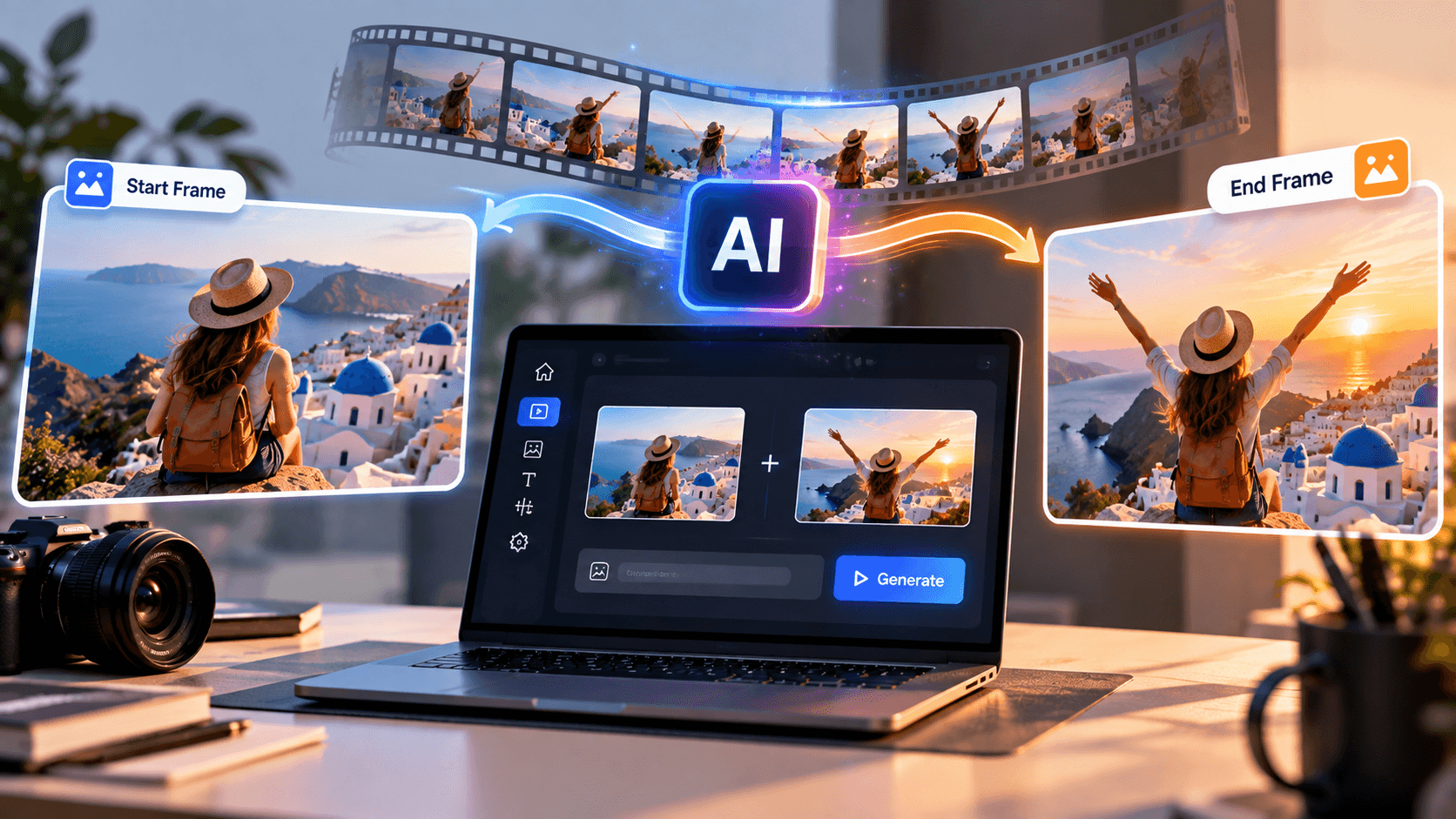
The AI video generator start and end frame allows one to provide a beginning frame and an ending frame in a video and enables the AI to create the motion and transition from one to another. This becomes useful when creating product videos, cinematic transitions, social media videos, narratives, advertisements, and any kind of experiment that needs visual continuity.
Rather than just creating an unpredictable clip, you can tell the AI where the video is supposed to start and where it should end. Here is a guide to generating videos using the start and end frames.
What Is an AI Video Generator With Start and End Frame?
An AI video generator with start and end frame is a video creation tool that generates the frames between two supplied images.
You provide:
• A first frame that defines how the video begins.
• A last frame that defines how the video should end.
• An optional text prompt describing the desired movement, camera direction, environment, or transformation.
The AI analyzes both images and creates a sequence that connects them. For example, your first frame could show a closed product box while your final frame shows the product fully revealed. The AI can generate the opening motion between those two points. This gives creators more control than standard image-to-video generation because the destination of the video is already defined.
How Does a First and Last Frame Video Generator Work?
A first and last frame video generator uses generative video models to predict the visual changes required to move naturally from the starting image to the ending image.
The process typically works like this:
• Upload the image you want as the opening frame.
• Upload the image you want as the final frame.
• Describe what should happen between the two images.
• Choose available video settings.
• Generate the clip.
• Review the motion and regenerate if necessary.
The AI attempts to maintain important visual information such as subjects, objects, composition, lighting, and camera perspective while creating intermediate frames. The better your two source images work together, the more natural the generated transition can appear.
How to Use an AI Video Generator Start and End Frame Feature
The actual interface will vary between platforms, but the basic workflow is straightforward.
Step 1: Prepare Your First Frame
Start with a clear, high-quality image. Your first frame determines the initial composition of the video. Make sure important objects and subjects are clearly visible. For example, if you are creating a fashion advertisement, the first frame might show a model standing still while wearing the featured product. Avoid overly complicated backgrounds unless they are important to the scene.
Step 2: Create Your Final Frame
Next, decide how you want the scene to finish. The second image should ideally maintain some visual relationship with the first. Dramatically different images can be used creatively, but generating a realistic transition between them may be more difficult.
For example:
• First frame: A car parked in front of a building.
• Last frame: The same car farther down the road.
The AI can interpret the difference and generate driving motion between the two frames.
Step 3: Upload Both Images
Open your preferred AI video generation platform and select its first-and-last-frame or start-and-end-frame option. Upload the opening image into the first-frame section and the destination image into the last-frame section. Double-check the order before generating. Reversing the images can completely change the intended animation.
Step 4: Write a Clear Motion Prompt
Your prompt should explain what happens rather than unnecessarily describing everything already visible in the image.
For example: “The camera slowly moves forward as the model turns toward the product. Natural body movement, realistic studio lighting and smooth cinematic motion.” This gives the model useful information about movement.
A weak prompt might simply say: “Make a cool video.” More specific instructions generally give the generator clearer direction.
Useful details can include:
• Camera movement
• Subject movement
• Speed
• Lighting changes
• Environmental movement
• Cinematic style
• Transition behavior
Keep your instructions focused instead of writing an extremely long prompt.
Using an AI Video Maker From Image
An AI video maker from image is useful when you already have strong visual assets but need to transform them into video content. Product photographers, designers and marketers can turn static images into short promotional clips without recreating the entire scene in traditional video software.
For example, you could transform:
• Product photos into ecommerce advertisements
• Character artwork into animated scenes
• Travel photographs into cinematic clips
• App screenshots into promotional visuals
• Fashion photography into social media videos
• Concept art into storytelling sequences
Start-and-end-frame control adds another layer because you are not only determining where the animation begins. You can also influence exactly where it finishes.
Can You Make AI Videos From Text?
Yes. Many modern platforms also let creators make AI videos from text . Instead of uploading an image, you describe a scene using a prompt and the AI generates the visual content.
For example: “A cinematic aerial shot of a futuristic coastal city during sunrise, realistic architecture, slow forward camera movement.”
Text-to-video is useful when you do not already have source imagery. Image-to-video is better when maintaining a particular product, character, composition, or design is important.
Start-and-end-frame generation is especially useful when you need additional control over both the beginning and destination of the scene. Creators can also combine these workflows. You might generate images first and then use those images as your first and last frames.
Tips for Better Start and End Frame AI Videos
Getting convincing AI video results requires more than simply uploading two random images. Try to maintain a similar aspect ratio and visual composition between both frames. If a character suddenly changes size or position dramatically, the model has to create a more complex transition.
Keep prompts focused on movement. Instead of repeating details visible in the images, describe what should happen between them. You should also avoid asking for too many actions within a very short video. A five-second clip containing multiple camera movements, character actions, scene changes, and transformations may become visually inconsistent.
Simple motion often produces more professional results. For product videos, subtle movement can be particularly effective. Slow camera pushes, slight rotations, controlled lighting changes, and natural environmental motion can make the video feel polished without distracting from the product.
Why Start and End Frames Are Useful for Content Creators
The biggest benefit is creative control. Standard AI generation can produce impressive footage, but the final composition is sometimes unpredictable. Defining the ending frame makes the intended outcome clearer.
It can be especially useful for:
• Social media ads
• Product launches
• Brand campaigns
• Short cinematic sequences
• Before-and-after transformations
• Music videos
• Storytelling
• Concept visualization
• YouTube Shorts
• Instagram Reels
It also makes it easier to plan multiple AI-generated shots because each clip can be designed around predetermined visual states.
Consider How AI Video Credits Work
AI video generation often requires several attempts before you get exactly the movement you want. That means the platform's credit system can matter almost as much as its generation features. The AI video generator with credits that do not expire will be convenient for creators who need to create video from time to time but not every month.
Creators will have an opportunity to save their available credits for the next project. When choosing AI video generators, the quality of generation should be taken into account together with other factors like credit price, resolution, duration of video, available models, generation speed, and commercial use policy.
Final Thoughts
An AI video generator start and end frame workflow gives creators significantly more control over AI-generated motion. Rather than requiring AI to generate the whole video, you specify two visual points - when and how your scene begins and ends.
Together with a concise motion prompt, it will help to get controlled transitions, product animations, cinematic and marketing clips. Depending on whether you are using the first and last frame video generator, AI video maker based on images, or text-to-video generation, the main thing is to give AI a hint about visuals without complicating your scene. With the development of AI video technologies in 2026, the combination of text prompts with visual examples becomes more and more convenient.
Frequently Asked Questions
What is an AI video generator with a start and end frame?
It is an AI video tool that lets you upload an opening image and a closing image. The AI generates the movement and intermediate frames required to create a video connecting those two images.
How do I create a video using first and last frames?
Upload your first image, upload the final image, give a prompt that describes the desired movement, set your generation settings, and create the video. To get the best output possible, it is recommended to use images with similar compositions and subjects.
Can AI turn two images into a video?
Yes. A first and last frame video generator can take two images and create motion between the two. Output will be based on how complex the images are, the prompt given, and the AI model used.
Can I make AI videos from text without images?
Yes. With text-to-video AI tools, you can give a description of a scene using natural language and generate the video without having to upload an image. This is not always ideal since the image generation method is preferred for certain subjects and compositions.
What is the difference between image-to-video and start-and-end-frame generation?
Image-to-video usually animates one source image. Start-and-end-frame generation uses two visual reference points, giving the AI both an initial composition and a target final composition.
Are non-expiring AI video credits useful?
They can be useful for occasional creators because unused credits can remain available for future projects rather than requiring you to generate videos within a limited monthly period.